Vercel Blob File Uploader
Enable browser-to-blob file uploads for your members. Complete guide for setting up Vercel Blob storage with serverless functions.


- Setup time
- 10-15 min
- Cost
- Free tier included
- Platform
- Vercel only
No bucket config, no IAM policies.




How It Works
Vercel Blob handles storage, serverless functions manage uploads/deletes.
Browser Upload
Serverless Function
Blob Storage
Phase 1
Vercel Setup
Create Vercel Account & Project
- Go to vercel.com and sign up
- Click Add New... > Project
- Name it
blob-file-api - Click Deploy
Get the API Project Files
Option A: Clone the repo (Fastest)
git clone https://github.com/Magnaem-a/memberscript211.gitJump straight to Step 3.
Option B: Create files manually
File 1: package.json
{
  "name": "blob-file-api",
  "version": "1.0.0",
  "private": true,
  "type": "module",
  "dependencies": {
    "@vercel/blob": "^0.27.0"
  }
}
File 2: vercel.json
{
  "framework": null,
  "headers": [
    {
      "source": "/api/(.*)",
      "headers": [
        { "key": "Access-Control-Allow-Origin", "value": "*" },
        { "key": "Access-Control-Allow-Methods", "value": "GET, PUT, POST, DELETE, OPTIONS" },
        { "key": "Access-Control-Allow-Headers", "value": "Content-Type" }
      ]
    }
  ]
}
File 3: api/upload.js
const { put } = require('@vercel/blob');

module.exports = async function handler(req, res) {
  res.setHeader('Access-Control-Allow-Origin', '*');
  res.setHeader('Access-Control-Allow-Methods', 'PUT, OPTIONS');
  res.setHeader('Access-Control-Allow-Headers', 'Content-Type');

  if (req.method === 'OPTIONS') return res.status(200).end();
  if (req.method !== 'PUT') return res.status(405).json({ error: 'Method not allowed' });

  var filename = req.query.filename;
  if (!filename) return res.status(400).json({ error: 'filename required' });

  try {
    var blob = await put(filename, req, {
      access: 'public',
      contentType: req.headers['content-type'] || 'application/octet-stream',
      addRandomSuffix: false
    });
    return res.status(200).json(blob);
  } catch (e) {
    return res.status(500).json({ error: e.message });
  }
};

module.exports.config = { api: { bodyParser: false } };
File 4: api/delete.js
const { del } = require('@vercel/blob');

module.exports = async function handler(req, res) {
  res.setHeader('Access-Control-Allow-Origin', '*');
  res.setHeader('Access-Control-Allow-Methods', 'DELETE, OPTIONS');
  res.setHeader('Access-Control-Allow-Headers', 'Content-Type');

  if (req.method === 'OPTIONS') return res.status(200).end();
  if (req.method !== 'DELETE') return res.status(405).json({ error: 'Method not allowed' });

  var url = req.query.url;
  if (!url) return res.status(400).json({ error: 'url required' });

  try {
    await del(url);
    return res.status(200).json({ deleted: true });
  } catch (e) {
    return res.status(500).json({ error: e.message });
  }
};
Phase 2
Blob Storage
Create a Blob Store
- In Vercel Dashboard, go to your project
- Click the Storage tab
- Click Connect Database
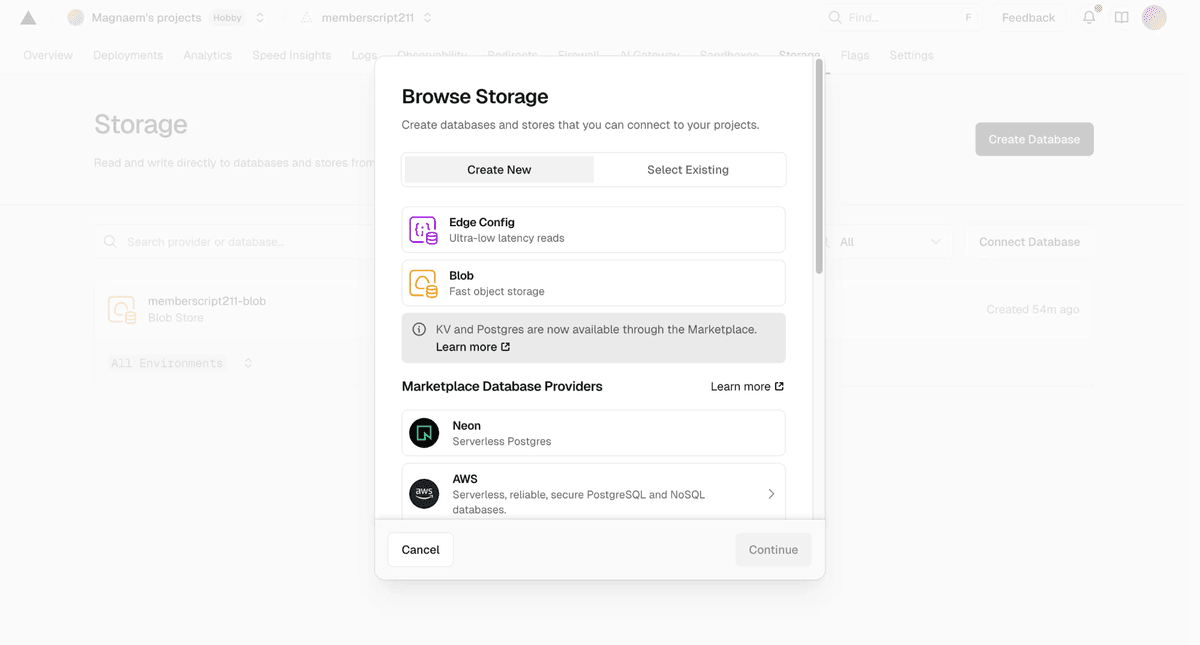
- Select Blob under Create New
- Name your store (e.g.,
file-uploads) - Select all environments and click Create
This auto-creates a BLOB_READ_WRITE_TOKEN environment variable.
Phase 3
Deploy
Deploy via Git or CLI
Option A: Git
- Push files to GitHub
- Connect repo in Vercel Settings
- Auto-deploys on push
Option B: CLI
npm i -g vercel- Run
vercel --prod
Get Your API URL
Your API URL looks like:
Phase 4
Memberstack Setup
Create Data Table
Create a table called uploads with these fields:
| Field | Type |
|---|---|
member | Text |
file_name | Text |
file_url | Text |
file_type | Text |
file_size | Text |
uploaded_at | Text |
Configure Your Site
Add the container with data-ms-field="blob-manager"
IMPORTANT: API URL must include https://
Switching from AWS S3
- Change
data-ms-field="s3-manager"todata-ms-field="blob-manager" - Update
data-ms-code-apito your Vercel URL - Remove
data-ms-code-bucketattribute
Vercel Blob vs AWS S3
| Feature | Vercel Blob | AWS S3 |
|---|---|---|
| Setup time | ~10 min | ~30 min |
| Services | Vercel only | S3 + IAM + API Gateway |
| Free tier | 500MB | 5GB |
| Max file | 4.5MB (500MB w/ client) | 10MB |
Troubleshooting
Security Notes
• Files are publicly readable via URL
• Token is server-side only
• Replace * with your domain for tighter security
Try Memberstack for free
100% free, unlimited trial — upgrade only when you're ready to launch. No credit card required.